
Shopify Product Page Layout Mistakes That Flatten CR
Open ten Shopify product pages built by an agency, a freelancer, or an AI tool, and you will find the same skeleton under all ten. A hero, three equal columns with an icon and a one line benefit, another three equal columns, a bordered card for shipping, a bordered card for returns, a bordered card for the guarantee, then an accordion. This is the most common of the shopify product page layout mistakes we see when we rebuild a page, and it is rarely about the words on it. It is the grid underneath the words.
The shopify product page layout mistakes hiding in plain sight
A page built from equal columns and bordered cards looks finished. It has structure, it has icons, it has whitespace. What it does not have is a focal point. Three columns of identical weight tell the eye that none of the three matters more than the others, which is almost never true. One of those three claims is the reason someone buys and the other two are supporting detail, and a page that renders them identically has thrown away the one piece of information a layout is supposed to carry: what matters most, first.
The bordered card compounds it. A rectangle with a hairline border and a drop of padding reads as a UI control, a thing you can click or choose. When every section of the page is built from that same rectangle, the page trains the visitor to stop looking for the one spot where a click actually matters.
Reserve the filled card for an actual choice
There is exactly one place on a product page where a bordered, filled card is the right tool: the offer selector, where the visitor is being asked to pick a real option. A tiered choice with the best value tier badged, the middle tier badged most popular, and a plain one time purchase shown small and unbadged is a genuine decision, and a filled card correctly signals this is clickable, pick one. Everywhere else on the page, that same visual weight is wasted on a feature list or a shipping note that nobody was ever going to tap.
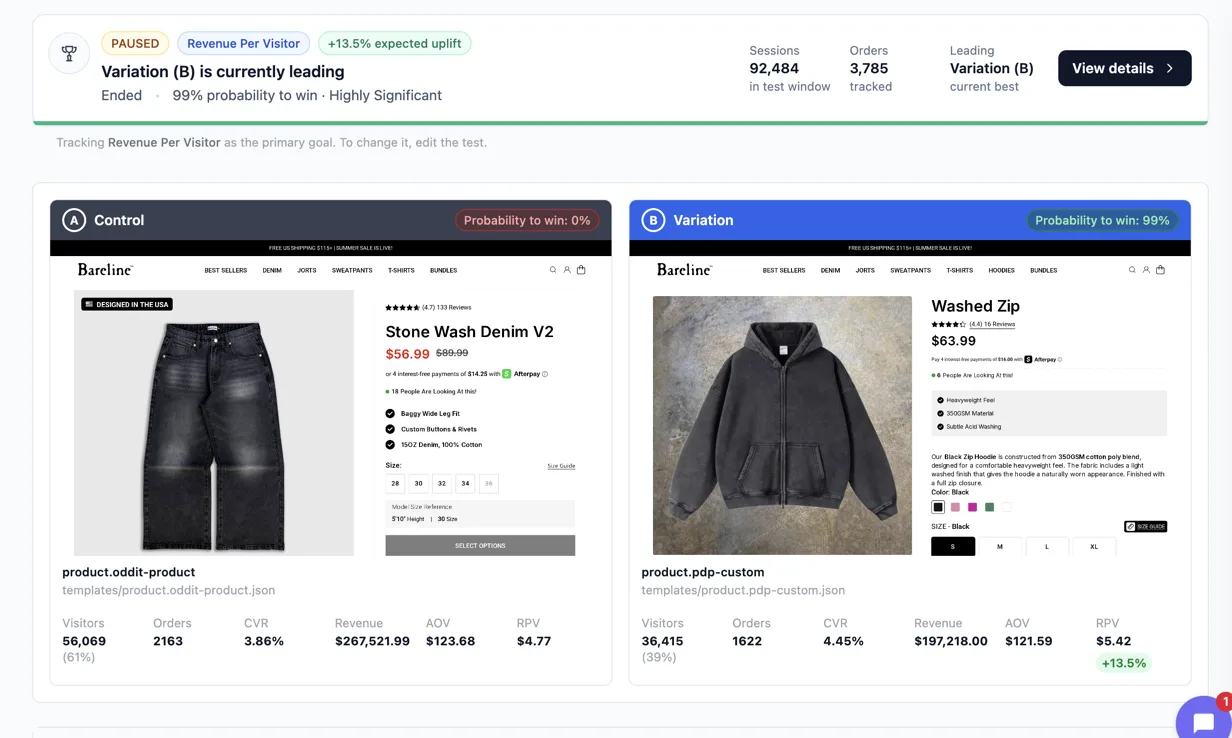
When we rebuilt Bareline, a streetwear denim brand, we tested our PDP template against their own PDP template on sitewide product traffic. The result was +13.5% revenue per visitor, 99% probability to win across 92,484 sessions on Eraya. Almost none of that came from new copy. It came from giving the page one real selectable moment and letting everything else recede into plain hierarchy.
Three equal columns means no columns at all
Equal weight is the default a page builder gives you for free, which is exactly why it is everywhere and exactly why it reads as templated the moment a founder looks at their own page. Breaking it does not require a redesign. It requires deciding which single claim deserves to be bigger, bolder, or alone on its own line, and then actually making the other two smaller.
The fix is rarely more design. It is less symmetry. Spend one genuinely bold moment on the page, a full width statement, a number set at twice the surrounding type size, a block that is allowed to be the only thing on its row, and let the rest of the page be quiet by comparison. A page that is light, dark, light, dark in even bands has not varied anything. It has just alternated the background color behind the same grid.
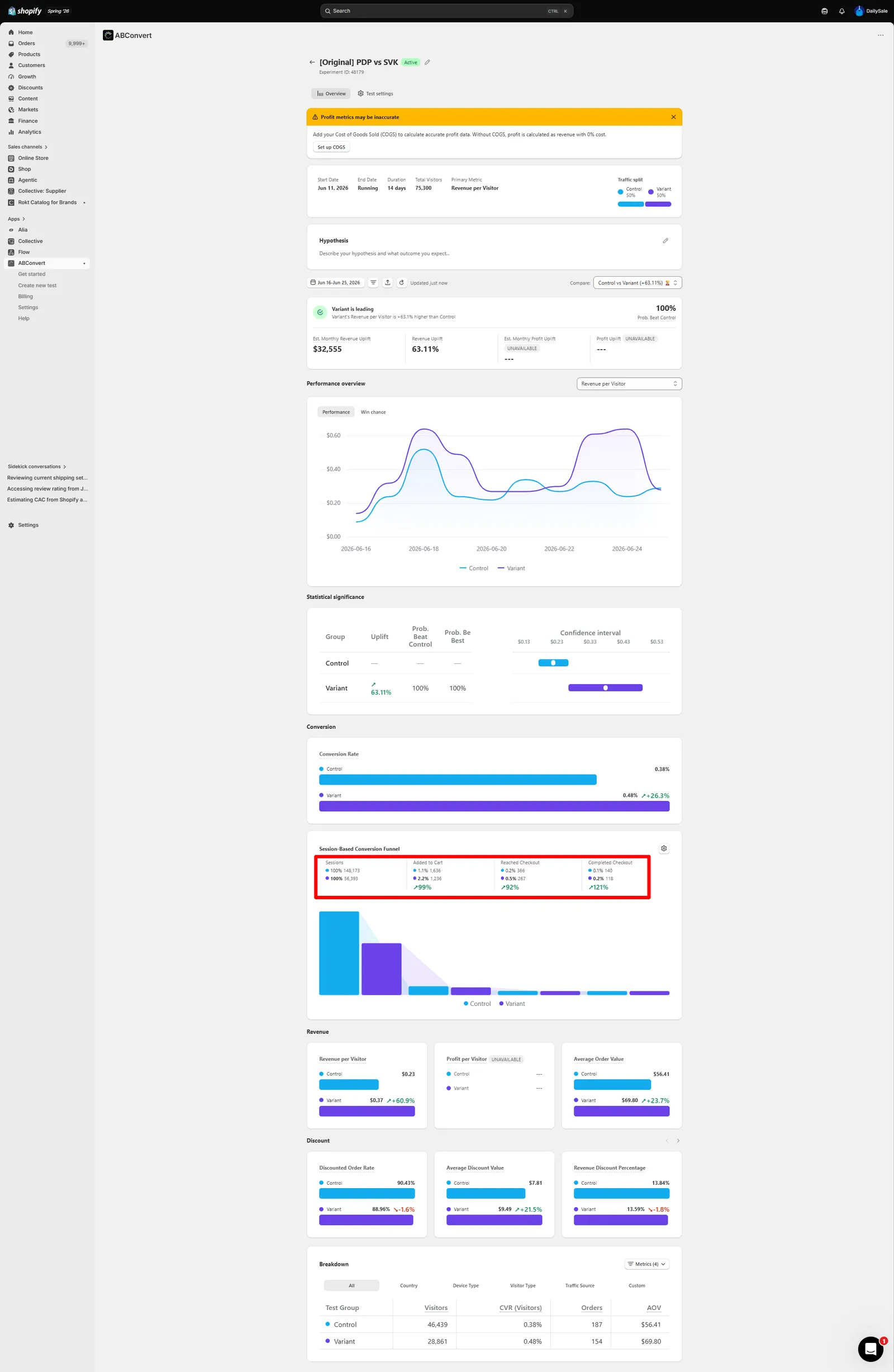
We saw this directly on Daily Sale, a discount retail brand. Our PDP against their PDP, read on ABConvert, came back +63% revenue per visitor, 100% probability to beat the control across 75,300 visitors. Their original page was built from stacked equal width cards. Ours was not.
Draw structure from the product, not from a component library
A numbered sequence of steps is only earned when the content is actually a sequence. A three icon feature row is only earned when the three features are genuinely parallel and equally important, which they almost never are. Most of the time what a page needs instead is a layout that comes from the product’s own material: a comparison when there is something real to compare against, a cost breakdown when the product replaces several things the buyer currently pays for separately, a single hero claim stated large when the brand has one fact strong enough to carry the page alone.
The grid is supposed to follow the argument, not the other way around.
When we rebuilt Sonic Brush, an oral care brand, against their own PDP on Google Ads traffic, the page read +24% revenue per visitor on ABConvert. The win there was not a new icon set. It was cutting the identical three column feature block and replacing it with one block sized to the claim that actually sold the toothbrush.
What this looks like before you ship
Before a rebuilt page goes live, check it against three questions rather than a checklist of components:
- Is there exactly one place on the page that looks like a real, clickable choice, and is it the offer?
- Does every other section use type size and spacing to show weight, instead of a border?
- If you removed the icons, would the three columns next to each other still make sense as three equal things, or were they never actually equal?
The full set of measured results, including pages tested PDP against PDP the same way Bareline, Daily Sale, and Sonic Brush were, is on /results/. If a page is already converting reasonably and you want to know what a controlled test on your own traffic would actually prove, the guarantee behind that test is explained on /guarantee/.
See it on your own page.
We rebuild your highest-leverage page and prove the lift on your own live traffic. A 10% lift in conversion rate, or your money back.
Book a call